A note on accuracy: Browser extensions are updated, renamed, or occasionally discontinued. The information below was verified at the time of publication and is reviewed regularly — but it’s always worth double-checking the Chrome Web Store listing before installing.
Keyboard shortcuts are great — once you’ve memorized them. For everyone else, a browser extension is often the faster path. Install it once, and you have instant access to accented characters from any text field in your browser, without memorizing a single code.
Here are five solid options available today on the Chrome Web Store, each suited to a slightly different kind of user.
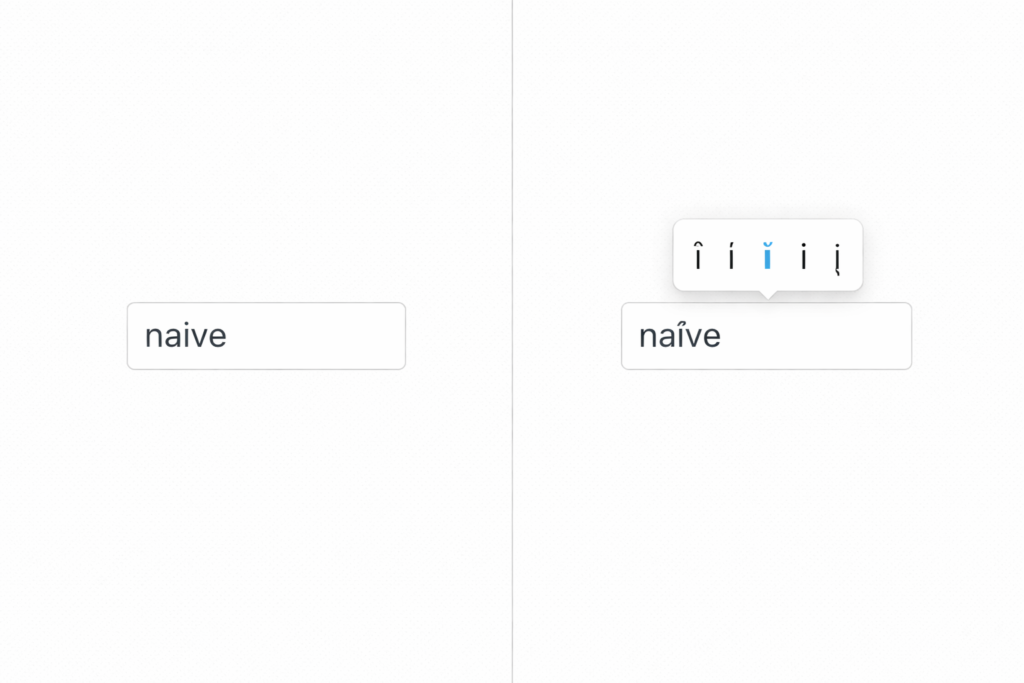
1. Accents Helper
This is one of the most intuitive options available. Accents Helper uses a hold-key system that will feel instantly familiar to anyone who’s typed accents on a smartphone: simply hold down a letter key for about 0.3 seconds, and a popup appears with accented versions of that character. Keep holding to cycle through the options.
It supports 14 European languages including Spanish, French, German, Italian, Portuguese, Polish, Turkish, and more — covering characters like á, ê, ñ, ç, ü, and ø. It also works with capital letters, which many similar extensions overlook. A built-in notebook lets you compose text with accents and copy it wherever you need it.
Best for: Language learners who want the most natural typing experience.
Chrome Web Store rating: 4.5 stars
2. Easy Accent Marks
Easy Accent Marks takes a click-to-insert approach. Open the extension, click the accented character you want, and it’s automatically copied and inserted into your active text area. Simple, reliable, no learning curve.
It covers a generous range of languages: Czech, Dutch, French, Finnish, German, Hungarian, Icelandic, Italian, Norwegian, Polish, Portuguese, Romanian, Spanish, Swedish, and Turkish. If you type in multiple languages and want a no-fuss tool that just works, this is a strong choice. The extension was last updated in March 2025, which is a good sign for ongoing support.
Best for: Multilingual users who want a quick click-and-insert solution.
Chrome Web Store rating: 3.7 stars
3. Google Input Tools
If you need something more comprehensive — or you type in non-Latin scripts — Google Input Tools is in a different league. Developed by Google, it provides virtual keyboards for over 90 languages, along with transliteration support for more than 30 scripts and handwriting input for over 40 languages.
For accent purposes, you select your target language (say, French or Spanish), and the extension gives you a virtual keyboard with all the accented characters laid out and accessible. It works across any text field in Chrome, regardless of which website you’re on.
It does require a few minutes of setup — you’ll need to select your preferred input tools in the extension options — but once configured, switching between languages is a single click. One caveat worth noting: users have reported occasional bugs with certain languages, so it’s worth testing with your specific language before relying on it heavily.
Best for: Power users who work across multiple languages or non-Latin scripts.
Chrome Web Store rating: 4.0 stars
4. Accent Press
Accent Press is a lightweight, no-frills extension that does exactly one thing: gives you a simple interface to click on accented characters and insert them into your text. It’s small, fast, and stays out of your way when you don’t need it.
It’s particularly well-suited for users who only occasionally need an accent and don’t want to commit to a more complex tool. Click the extension icon, find the character you need, click it, and move on. That’s the entire workflow.
Best for: Casual users who need accents only occasionally.
Chrome Web Store rating: 4.5 stars
5. Special Characters: Unicode Symbols & Special Characters Picker
This one goes well beyond accents. The Special Characters Picker lets you find, copy, and insert virtually any Unicode symbol or special character instantly from your browser — accented letters, currency symbols, mathematical notation, arrows, punctuation marks from any writing system, and much more.
If your needs extend beyond the standard European accent marks — if you’re working with linguistics, math, or any specialized field that uses uncommon characters — this is the tool to have. The search function makes it easy to find exactly what you need without scrolling through endless character tables.
Best for: Anyone who regularly needs special characters beyond standard accent marks.
Chrome Web Store rating: 4.6 stars
Which one should you choose?
Here’s a quick summary to help you decide:
| Extension | Best for |
|---|---|
| Accents Helper | Natural hold-key typing, 14 languages |
| Easy Accent Marks | Click-to-insert, widest language range |
| Google Input Tools | Power users, 90+ languages |
| Accent Press | Lightweight, occasional use |
| Special Characters Picker | Beyond accents, any Unicode character |
All five are free and available directly from the Chrome Web Store. Most take less than a minute to install. If you’re not sure where to start, Accents Helper is the easiest to pick up for everyday language typing, while Google Input Tools is worth the slightly longer setup if you work across multiple languages regularly.